

This article describes the routing logic and the selection of connection settings (bitrate and resolution) for incoming calls to the Vinteo server.
After a decision is made regarding which settings will be used for the connection, Vinteo server license limitations are also applied. If the license does not allow establishing a call with the settings selected during routing, a resolution permitted by the license will be chosen instead.
When establishing a connection, the server “offers” the connection parameters selected during routing from the corresponding settings. If the VCS client does not support them, supports only lower parameters, or has technical or licensing limitations on the client side, those limitations will be applied.
Incoming call from an anonymous user
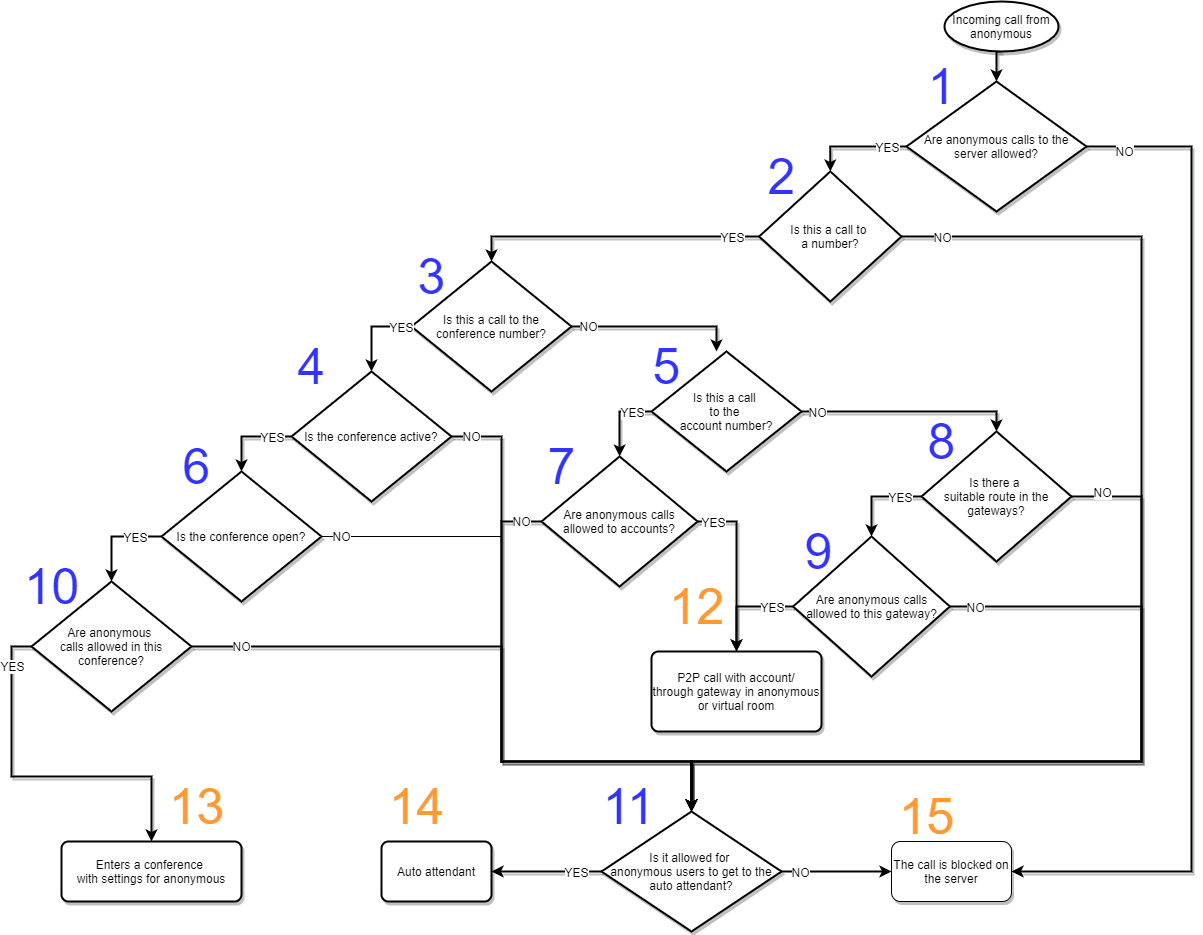
Description of logical checks shown in the diagram
-
Are calls initiated via the H.323, WebRTC, or SIP protocol from anonymous users to the server allowed? (“System” – “Settings” – “Anonymous connection” – “Allow anonymous connection to the server”)?
-
Is the call initiated to a number, or only to the server address without specifying a number?
-
Is the dialed number a conference number?
-
Is the called conference enabled?
-
If the call is not to a conference number, is the called number a subscriber number?
-
If the call is to a conference, is it open (Conference – Settings – Connection settings – “Open conference”)?
-
If the call is to a subscriber number, are anonymous calls to accounts allowed in the server settings (System – Settings – Anonymous connection – “Allow anonymous connections to call accounts”)?
-
If the call is neither to a conference number nor to a subscriber number, is there a suitable route in the gateways (System – Gateways – Gateway settings – Routes)?
-
Are anonymous calls to a gateway with a suitable route allowed (“System” – “Gateways” – “Gateway settings” – “Allow anonymous users to use the gateway”)?
-
Are anonymous calls to the called conference allowed (“Conference” – “Settings” – “Connection settings” – “Allow anonymous connections to the conference”)?
-
Is access for anonymous users to the auto attendant allowed (System – Settings – Anonymous connection – “Allow anonymous connections to auto attendant”)?
Description of routing results shown in the diagram
-
If a call is initiated by an anonymous user to a subscriber number (see item 5) or to a gateway with a suitable route (see items 8, 9), a P2P call is established. In this case, the bitrate and resolution settings specified in the general anonymous connection settings are used (“Settings” – “Anonymous connection”).
-
If a call is initiated by an anonymous user to an existing number of an open conference (see items 4, 6) in which anonymous calls are allowed (see item 10), the call is routed to the conference with the settings configured for it (Conference – Settings – Default connection settings for anonymous users).
-
If the server settings allow anonymous users to connect to the auto attendant (see item 11), the call is routed to the auto attendant with the general anonymous settings (“Settings” – “Anonymous connection”). Any further connections by the anonymous user from the auto attendant will use these settings.
-
If anonymous calls are not allowed on the server (see item 1) or are not allowed by the conference settings (see item 10) and access to the auto attendant is not allowed (see item 11), the call is blocked on the server.
Incoming call from a subscriber
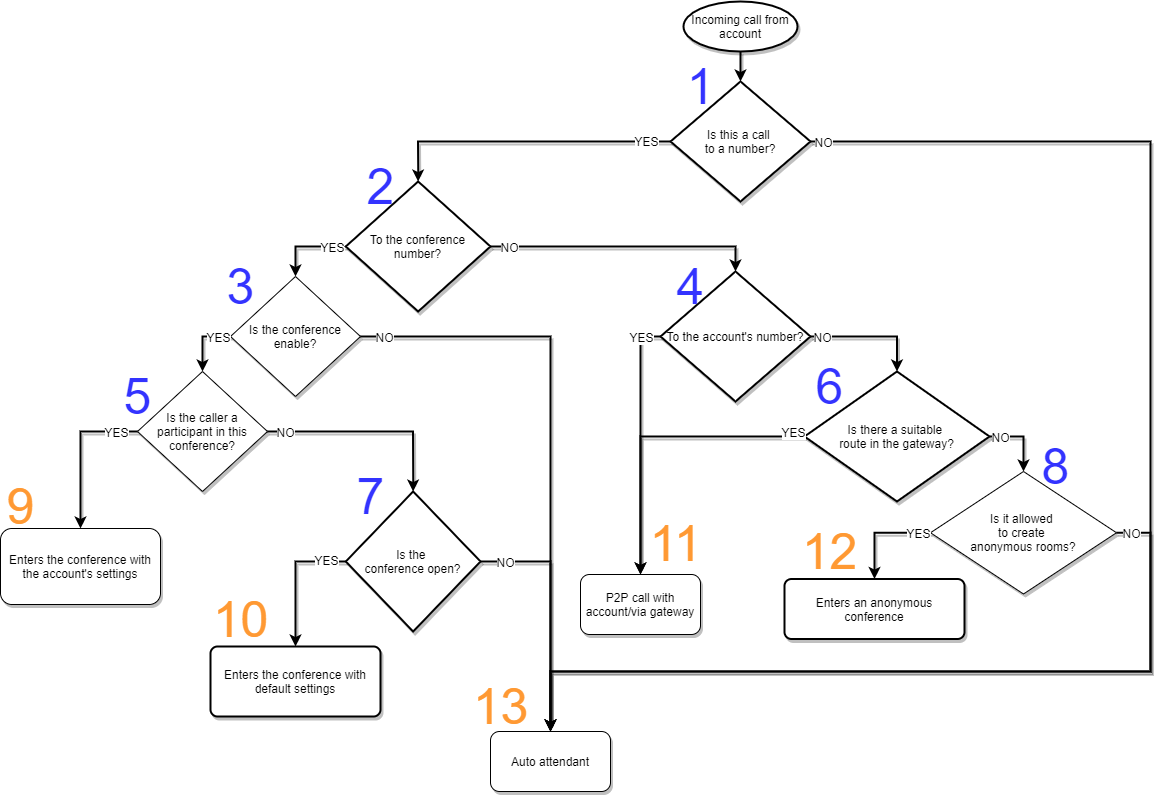
Description of logical checks shown in the diagram
-
Is this a call to a number?
-
Is the called number a conference number?
-
Is the called conference enabled?
-
Is the called number a subscriber number?
-
Is the calling subscriber a participant of this conference?
-
Is there a suitable route in the gateway?
-
Is the called conference open (Conferences ->
-> Settings tab -> “Conference properties” section -> “Open conference” switch )? -
Is the creation of anonymous rooms allowed?
Description of routing results shown in the diagram
-
If the call is made by a system subscriber who is a participant of an active (enabled) conference to the number of that conference, the call is routed to this conference. The connection bitrate and resolution are taken from the settings of the connecting participant (Conferences ->
-> “Participants” tab -> ).-> “Channel” and “Resolution” parameters -
If the call is made to the number of a conference that is active (enabled) and open, the call is routed to the conference using the default settings.
-
If the call is made to a subscriber number and there is a suitable route in the gateway, a P2P call is established. In this case, the bitrate and resolution settings specified in the subscriber profile are used (Accounts -> List ->
-> “Main settings” tab -> “P2P call resolution” parameter ). -
If there is no suitable route in the gateway, but the creation of anonymous rooms is allowed, the call is routed to an anonymous conference.
-
If the conference is disabled (inactive) and its settings do not enable the switch allowing the creation of anonymous rooms, the call is routed to the auto attendant of this conference. The connection bitrate and resolution are taken from the conference settings.