Gateways
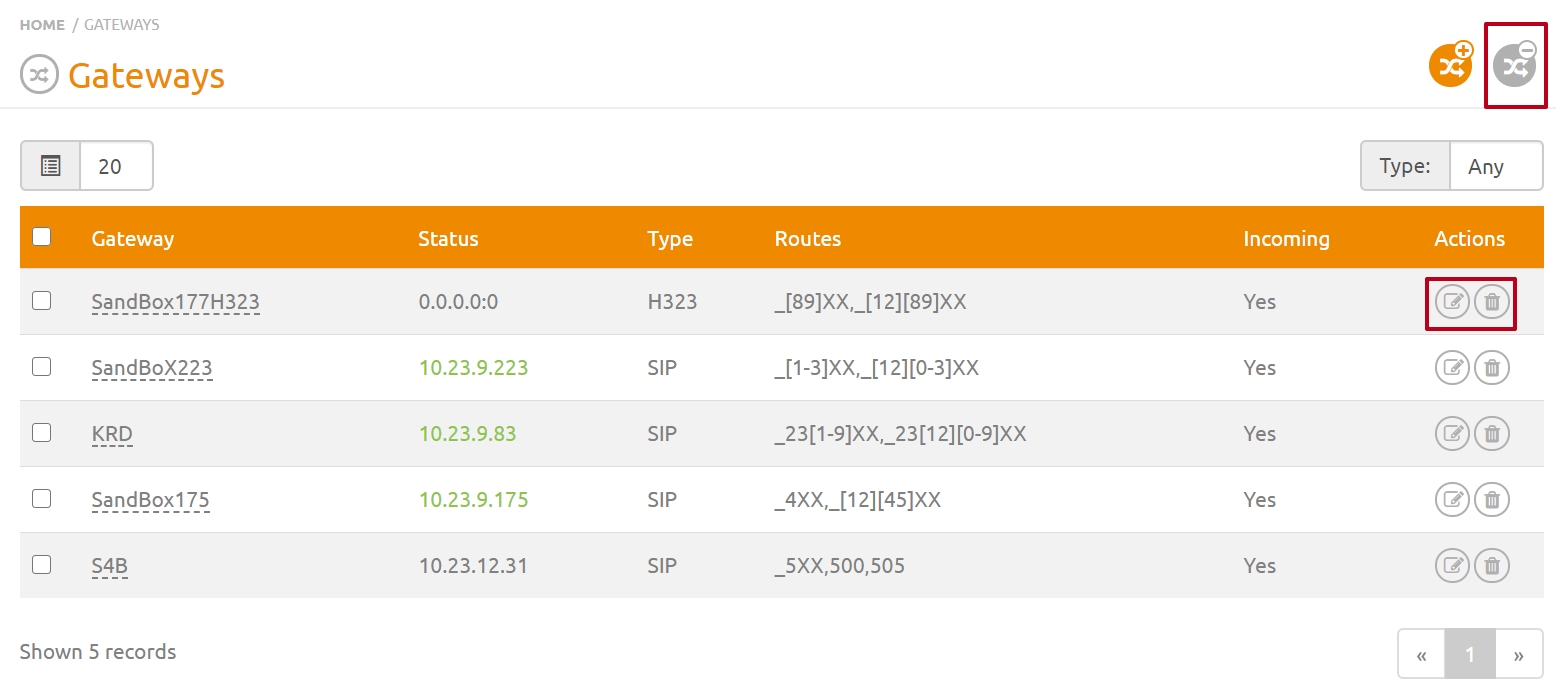
This page allows you to view all gateways added to the server. Gateways are any network connections using the SIP or H.323 protocols to digital PBXs, PBX servers, and other media servers.
Adding a Gateway
To add a gateway to the server, you must:
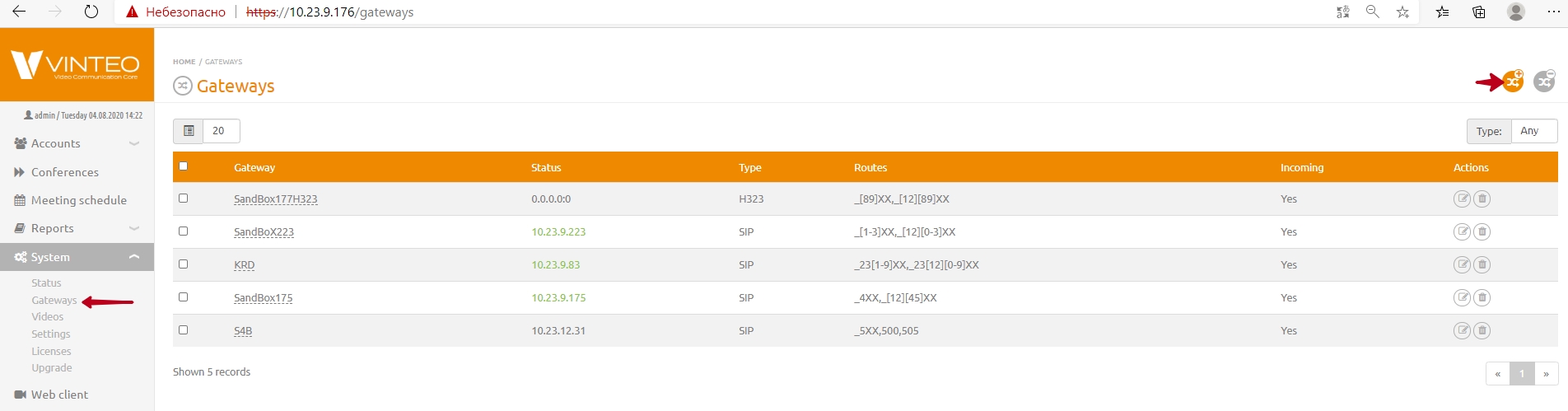
* In the main configuration menu, from the “System” dropdown list, select the “Gateways” menu item — the “Gateways” page will open;
* Click the “Add Gateway” button in the top right corner;
* Fill in the required parameters:
“Main” Tab
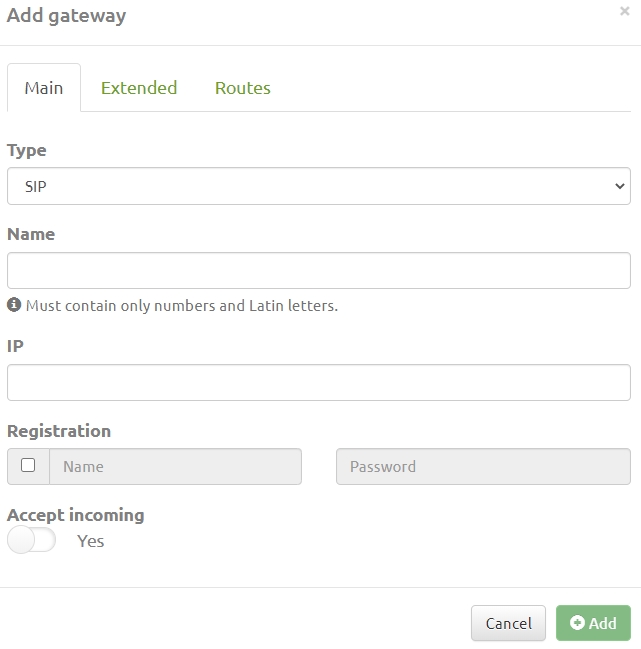
* “Type” — select the protocol for connecting to the gateway;
* “Name” — enter a name containing only Latin letters or digits;
* “IP” — network address in IPv4 format;
* “Registration” — enter the username and password for connecting to the gateway, if required;
* “Accept Incoming” — enables/disables the ability to receive incoming calls from this gateway. The switch activates the “Incoming Call Number Transformation” field.
“Advanced” Tab
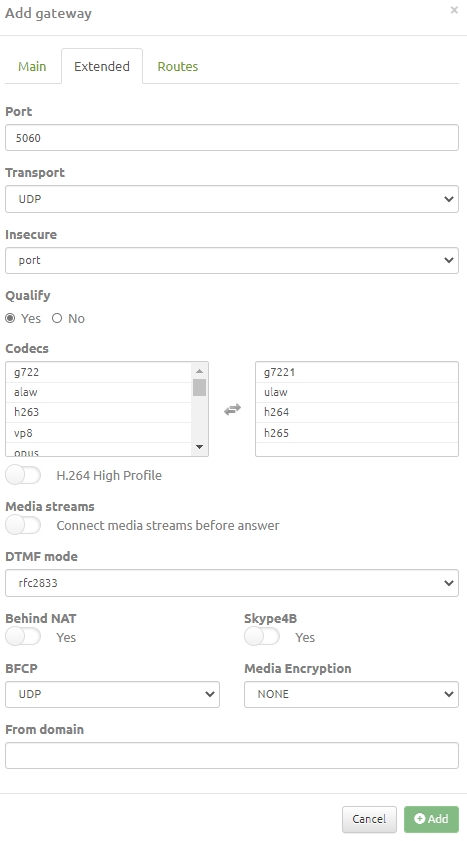
* “Port” — the port number on which the gateway listens for incoming network packets;
* “Transport” — select the data transfer protocol: UDP, TCP, TLS. For UDP, the re-registration period is set to 3600 seconds;
If the PBX restarts frequently and re-registration issues are critical, TCP transport should be selected.
* “Unsafe” — select the security level: “PORT”, “INVITE”, “VERY”;
– PORT — allow peer matching by IP address without checking the port number;
– INVITE — do not require an initial INVITE message for authentication;
– VERY — ignore authorization (user/password). Usually used to receive incoming calls (e.g., public or test entry);
* “Qualify” — this option sends SIP OPTIONS messages to check the availability of subscriber devices;
* “Codecs” — defines the list of codecs supported by the remote media server;
the “H.264 High Profile” toggle — the video codec profile for transmitting high-definition images;
* “Media Streams” toggle — enables the ability to start media (audio/video) before establishing a SIP session;
* “DTMF Mode” — determines the supported DTMF signaling standard for the remote server;
* “NAT” field — enables/disables network address translation mode for connecting to the remote server;
* “Skype4B” toggle — enables/disables recognition of the server as a VIS server for Lync/Skype for Business;
* “BFCP” — protocol for transmitting content during a SIP call;
* “Media Encryption” — enabling encryption of the media stream during a SIP call;
* “From domain” — field for entering a SIP URI;
* “RTP Filtering” toggle provides additional server protection. This feature prevents connections from one media port from sending additional media streams to the server.
“Routes” Tab
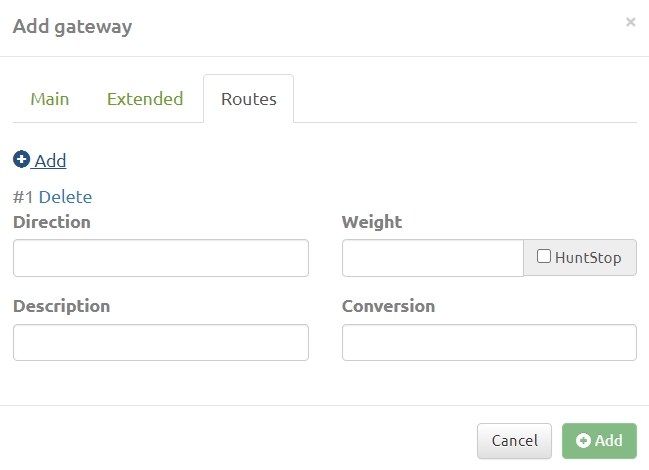
* “Direction” — a string parameter that sets the route using a specific value or a pattern.
* “Weight” — a numeric value affecting the priority of the created route; it is used if an identical direction exists in another gateway. Priority is given to the route with a lower weight;
* “Note” — a string describing the route;
* “Transformation” — a string parameter for transforming the number sent to the gateway when the route is selected. The parameter can use the variable ${EXTEN}, which contains the original number used to select the route.
String Format for Setting “Direction”
The direction can be a specific value (an alphanumeric string) or a pattern.
A pattern is indicated by the symbol “_” at the beginning of the line. The following symbols and structures can be used in the pattern:
* X — any digit from 0 to 9;
* Z — any digit from 1 to 9;
* N — any digit from 2 to 9;
* [12345-9] — any digit from the range 1,2,3,4,5,6,7,8,9;
* . — can be used at the end of the pattern and means one or more remaining characters. For example, _9011. will match 90112, 90116789, and so on.
Examples:
* _8495XXXXXXX — a number consisting of 11 digits, starting strictly with 8495 and followed by any digits from 0 to 9;
* _8495. — a number consisting of any number of digits, starting strictly with 8495 and followed by any digits from 0 to 9;
* _[012]4567 — a number consisting of 5 digits, starting with 0, 1, or 2 and ending with 4567;
* _9[45678]43567 — a number consisting of 7 digits, starting strictly with 9, followed by digits 4, 5, 6, 7, 8, and ending with 43567;
* _786124848440 — a number consisting strictly of 12 digits and fully matching the regular expression.
String Format for Setting the “Transformation” Parameter
The variable ${EXTEN} contains the original number for which the direction was selected. This variable can be used only in the “Transformation” parameter.
Consider the expression ${EXTEN[:x[:y]]}.
Here x is the number of characters from the beginning of the string that will be discarded, and y is the number of characters that will be taken from the number specified in the variable. If y is not specified, all remaining characters up to the end of the string are taken.
Example 1
Suppose this variable contains the number 8495111123 and the task is to replace the first digit “8” with the prefix “12347”. This is solved by changing the variable to the expression: 12347${EXTEN:1} where “:1” means to copy all digits from ${EXTEN} starting from the second one (left to right).
Example 2
Suppose you need to extract three digits from the standard variable ${EXTEN}, starting from the fourth digit. You can use the following record: ${EXTEN:3:3}
Deleting and Editing
Deleting and editing a gateway is done using the buttons in the “Actions” column of the “Gateways” list. You can also select one or more gateways using checkboxes and click the button in the top right corner of the page, then confirm the action.